Windowmaker Options | Windowmaker Software text/x-generic nav-menu-wm.blade.php ( HTML document, UTF-8 Unicode text, with very long lines, with CRLF line terminators ) text/x-generic nav-menu-wm.blade.php ( HTML document, UTF-8 Unicode text, with very long lines )

Windowmaker Options

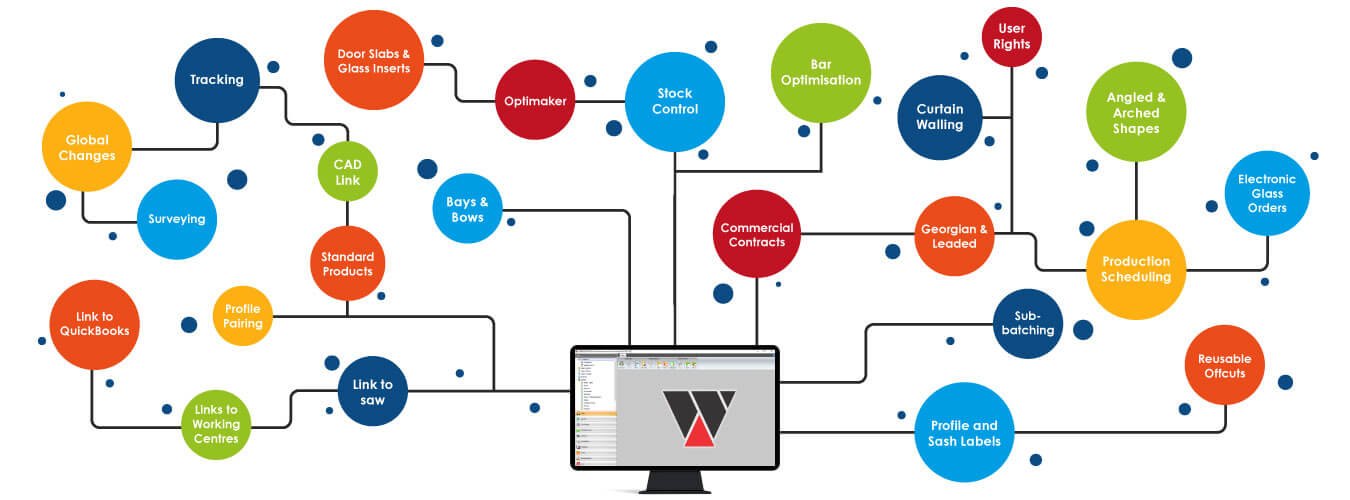
In addition to the standard product Windowmaker Software (Lite, Express, SQL), there are a wide range of additional options that can be added to the core system to increase and enhance the features and capability of the software. Use our Options Guide to know the possibilities. Explore, choose and package the options that are right for your business.


Compare features

Right - included, Right - not included, $ - available as on add-on, POA - Price on Application

  • The Configurator
    • Angled Heads

      Complex angled designs, with accurate calculations for frame, sash & glazing.

    Right Right Right
    • Arched Heads

      Complex arched designs with different types of joins, Georgians, etc.

    Right Right Right
    • Bays & Bows

      Multi-faceted bay/bow designs, with up to 12 facets, and flag windows

    Right Right Right
    • Georgian & Leaded

      Georgian grids in rectangular, semi-circular, circular windows with normal/spoked transoms/mullions, and other complexities

    Right Right Right
    • Panels

      Import panel graphics as image files, use them as wallchart or filtered list

    Right Right Right
    • Entrance Doors

      Generate quote and production document with the necessary info; slab and glass purchase orders separately

    Right Right Right
    • Multiple material e-catalogs

      Flexibility to process items using different materials in a single order

    Right Right Right
    • Windload

      Evaluate wind pressure; filter out profiles and glass that do not meet the required parameters

    $ $ Right
    • Big Designs (Curtain Walling)

      Items up to max size of 65m X 65m, and grid size of 50 X 50

    Cancel Cancel $
    • Standard Products

      Set up frequently sold items as Std Products to reduce order entry time and errors

    $ $ Right
  • Sales
    • Global Changes

      Apply multiple changes simultaneously to all or selected sales lines; run what-if scenarios for checking impact

    Right Right Right
    • Revisions

      Manage and keep track of one or several revisions to a Quote

    Right Right Right
    • History

      Maintain the progression of a quote right through the manufacturing process; store all communications with a customer

    Right Right Right
    • Commercial Contracts

      Split and manage large commercial orders

    Cancel $ Right
    • Stored Price Lists

      Flexibility to handle complex pricing strategies

    Cancel Cancel Right
    • Optimised Costing / Pricing

      Calculates the profitability (+/-) of each order so you can tweak your pricing; enables you to be competitive and not make losses on atypical orders

    Cancel $ Right
    • Special Customer Terms

      Generate links to saws, welders, working centres and glass cutting tables.

    $ $ Right
    • CAD Link

      Transfer Elevations and Cross-Sections to CAD

    $ $ Right
  • Survey
    • Survey sheet

      Pre-defined format of Survey sheet allowing 3 measurements for each

    Right Right Right
    • Surveying

      Tracking items pending survey; validate surveyed sizes against tolerance limits

    $ $ Right
    • Survey Scheduling

      Optimally utilise surveyor availability; schedule surveys via calendars, and drag-and-drop appointments, split appointments

    $ $ Right
    • Link to WMM

      Coming soon

    Right Right Right
  • Purchase
    • Purchase Order reports

      Eliminate errors by automatically generating Purchase Orders for BTO components

    $ Right Right
    • Purchase Tracking

      Track the receipt of items ordered; automatically update stock records to reflect pending items.

    Cancel Cancel Right
    • Purchase Scheduling

      Streamline operations by ensuring the availability of BTO components at the right time and place for manufacturing/delivery

    Cancel $ Right
    • Electronic Glass Order

      Eliminate errors and save time by transferring details of the required glass to glass suppliers.

    Cancel Cancel Right
    • Windowmaker Stock Control

      Sophisticated and efficient inventory management module.

    Cancel $ POA
    • Link to Stock

      Generate the required details to transfer to an external Inventory Management software.

    Cancel Cancel POA
    • Manufacturing
      • Production Work Instructions

        Generate accurate work instructions for each operation on the shop floor to increase throughput.

      Cancel Right Right
      • Bar Optimisation

        Reduce profile wastage by organising the cutting sequence of profile pieces within a job, batch or sub-batch.

      Cancel Right Right
      • Bar Optimisation Advanced (II & III)

        Reduce profile wastage by organising the cutting sequence of profile pieces through an advanced algorithm.

      Cancel $ Right
      • Reusable Offcuts

        With a customisable set up, manage your offcut pieces better and reduce wastage.

      Cancel Right Right
      • Profile/Part Labels

        Easily identify individual parts of a sales line; increase efficiency and reduce errors.

      Cancel Right Right
      • Profile/Part Labels Advanced (II)

        Save costly remakes by reducing machining errors; automatically output machining information in addition to the piece identifying parameters.

      Cancel $ Right
      • Production (Frame, Sash & M/T) Labels

        Generate labels with all necessary information for easy identification and processing throughout the manufacturing workflow.

      Cancel Right Right
      • Sub-batching

        Split large production batches into manageable sub-batches to process easily.

      Cancel $ Right
      • Production Scheduling

        Schedule a batch for production considering lead times for raw material, production capacity, required delivery dates, etc.

      Cancel $ Right
      • Advanced Production Scheduling

        Optimise production across sites and by scheduling different items within an order into different production batches.

      Cancel Cancel $
      • Multiple Sites

        Make optimal use of resources across multiple sites while planning production.

      Cancel Cancel $
      • Tracking

        Get complete control of your shopfloor. Increase your operational efficiency by tracking individual frames/sashes from production to delivery.

      Cancel Cancel Right
      • Remakes

        Choose to only output BOM for the required material while remaking an item; schedule the remake; analyse reasons for the remake.

      Cancel Cancel Right
      • Glass Optimisation

        Optimise glass yield by organising the cutting sequence of glass.

      Cancel Cancel Right
      • Links to Saws

        Control Saw operations automatically - maximise saw capacity, save on remakes, reduce input time for each batch, maximise shop floor productivity.

      Cancel Cancel POA
      • Links to Working Centres

        Control machining operations automatically - get accurate cutting and machining output, reduce set-up time, maximise capacity utilisation, eliminate paperwork and mistakes.

      Cancel Cancel POA
      • Links to Welders (4 head)

        Automatically generate instructions to be loaded into your welder - maximise capacity utilisation, reduce costs by cutting wastage, save on set-up time.

      Cancel Cancel POA
      • Link to Glass Optimisers

        Link Windowmaker to any external Glass optimiser program.

      Cancel Cancel POA
      • Links to Glass Cutting Tables

        Automatically control glass cutting operations by linking to your cutting table.

      Cancel Cancel POA
    • Delivery
      • Delivery reports

        Automatically generate despatch notes with details of items to be loaded in each consignment; include details of material to be directly delivered to the site.

      Cancel Right Right
      • Delivery Scheduling

        Allocate sales orders to individual deliveries, taking into account delivery routes and available capacities.

      Cancel Cancel Right
      • Advanced Delivery Scheduling

        Gain more flexibility moving items within a sales order, depending on delivery routes and capacities.

      Cancel Cancel $
    • Installation
      • Installation Instructions

        Automatically generate reports that include precise quantities of material required for installation at customer site. Customise the report to suit your needs.

      Cancel Cancel Cancel
      • Installation Scheduling

        Manage installation teams and time slots efficiently with a focus on customer convenience.

      Cancel Cancel Cancel
    • Invoicing
      • Link to Sales

        Save time and avoid costly mistakes by exporting Invoice transaction to external Accounts Receivables systems.

      POA POA POA
      • Link to QuickBooks (Sales)

        Save time and eliminate duplication of order entry by automatically linking Windowmaker to Quickbooks.

      POA POA POA
    • Sales Management
      • Sales Analysis

        Analyse revenues on various parameters.

      Right Right Right
      • Management reports

        Have your hand on the pulse of your business with critical information and analysis at your fingertips.

      Right Right Right
      • Dashboards

        View information for every department in a graphical format for easy comprehension and timely decision making; customise what you want displayed on the dashboards.

      Right Right Right
    • Administration
      • User rights

        Empower staff and simultaneously secure your business information by setting up user rights so they have access to the required information/features.

      Right Right Right